01
Balances with clarity
Actual transactions stay separate from expected payments. Know which funds are already available.
Know what you have now. See what needs paying next. Plan your next step with Finliso — in your browser and Telegram.
Your own data · no card requiredWhen cash details live in spreadsheets, conversations and someone else’s memory, even a simple question takes searching. Finliso helps bring daily cash management together.
A promised payment is a plan.
Cash in the account is a fact.
You need an answer to the question that matters right now, without another complicated system.
Revenue does not always mean cash in the bank. Bring expected income and expenses into a payment calendar to spot a potential cash gap ahead of time.
From your first transaction to planning months ahead. Discover the tools you need as your tasks evolve.
Actual transactions stay separate from expected payments. Know which funds are already available.
Income and expense calendar, recurring payments and a forecast based on the plan you enter.
Schedules, partial payments and remaining commitments, connected to your cash flow.
Find transactions by period, account, category, counterparty and project.
Upload a CSV, map its columns and review rows before importing. Reconcile payments and check possible duplicates.
Assign owners, editors and viewers. Review changes in the organization audit log.
Tracking helps you understand yesterday. Planning helps you prepare for tomorrow. Together, they give your decisions more context.
Build your cash picture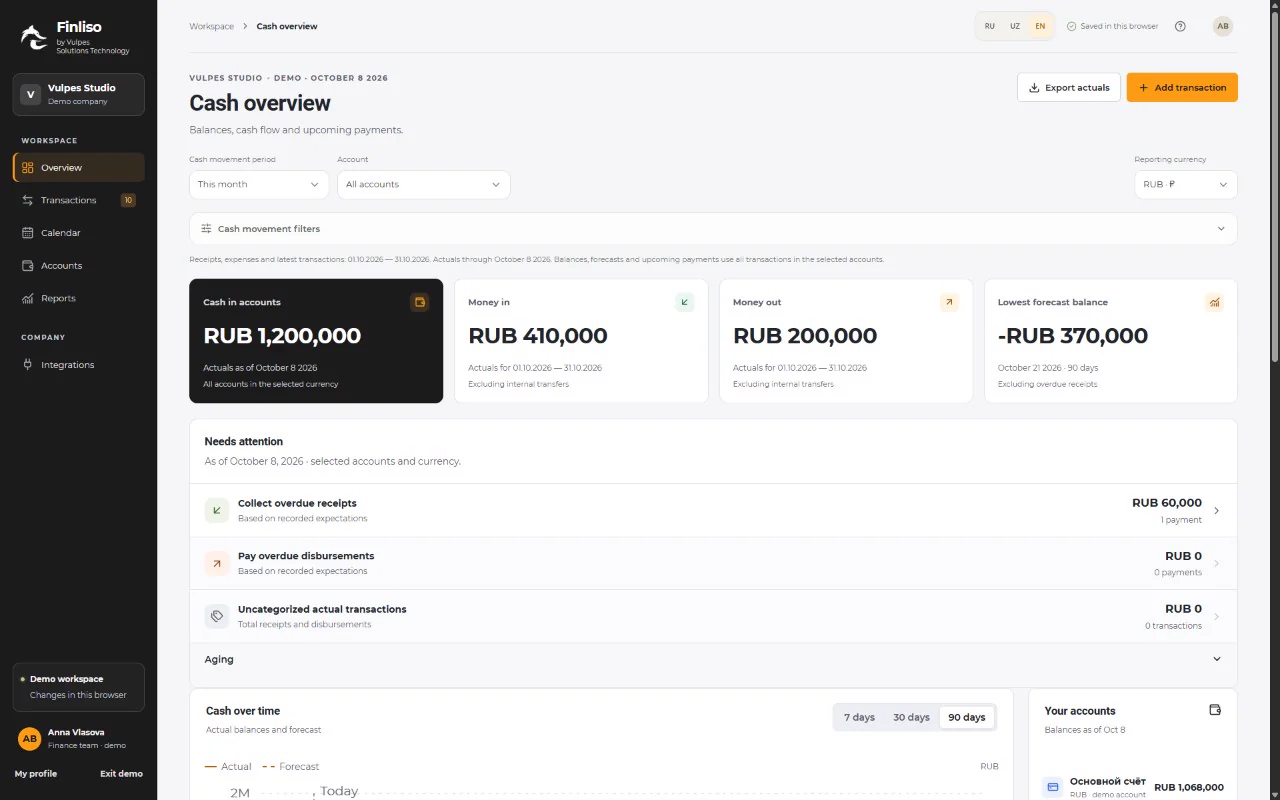
A shared view of cash and upcoming commitments helps you discuss plans using real information.
Plans, actual transactions, statements and installments fit into a consistent daily routine.
Project and counterparty filters help you find the payments you need without searching every transaction.
Check the next payment between meetings. Record an expense while it is fresh. Finliso Mini App brings the same cash management into Telegram.
Expected-payment import is prepared for Bitrix24, amoCRM and Odoo. Connections and workflows are configured for your organization.
Discuss an integration

 API
APIThe user confirms each import. Automatic synchronization is discussed separately as a future stage.
Try Finliso with your company for 14 days. No card required and no automatic charges.
Get 14 days of access for your company.
Set your currency and opening balances. Then continue at your own pace.
Keep expected income and expenses separate from completed transactions.
Financial features lock when the trial ends. Arrange continued access with our team; there are no automatic charges.
Start freeCreate an account for 14 days of access for your company. Add your accounts and upcoming payments to evaluate the service with your own needs. No bank card is required.
Trial access ends and financial features become locked. Contact our team to continue. Your card will not be charged automatically.
No. All organizations created in a trial account share one end date. Your personal profile and sign-in remain available afterwards.
Upload a CSV statement, select an account and map the date, amount, transaction type and payment description. Review the preview and possible duplicates before confirming. Save Excel statements as CSV first. Direct XLS, XLSX, PDF and EML imports are not supported yet.
Finliso tracks cash movements and helps plan payments. It does not replace statutory accounting or tax reporting.
Use several organizations in one account. Each has separate accounts, settings and access. Choose currencies in settings. Amounts in different currencies are tracked separately.
The forecast uses balances and entered plans. Actual dates and amounts may change. Overdue income is excluded from available future cash by default.
Bitrix24, amoCRM and Odoo support expected-payment imports with connection setup, preview and confirmation. Discuss your workflow and timing with our team.
Yes, via the Mini App. Sign in to your existing Finliso account on first launch and confirm your personal Telegram link.
Start with 14 days for your company. Or tell us about your needs — we will help find the right setup.
After 14 days, arrange continued access with our team.